
- Product
- Solution for
For Your Industry
- Partners
- Plans & Pricing
- Resources

For Your Industry
To detect competitor price changes in real time, ecommerce teams need an automated price monitoring system that tracks competitor websites, marketplaces, and reseller pages, matches equivalent products accurately, identifies price, stock, and promotion changes, then sends alerts or feeds those changes into pricing dashboards, reports, APIs, or dynamic pricing rules.
Manual checking is too slow for modern ecommerce. Competitors can change prices multiple times per day, launch flash promotions, update marketplace listings, or adjust prices based on stock levels. Real-time competitor price monitoring helps teams react before margin, ranking, or conversion performance is affected.
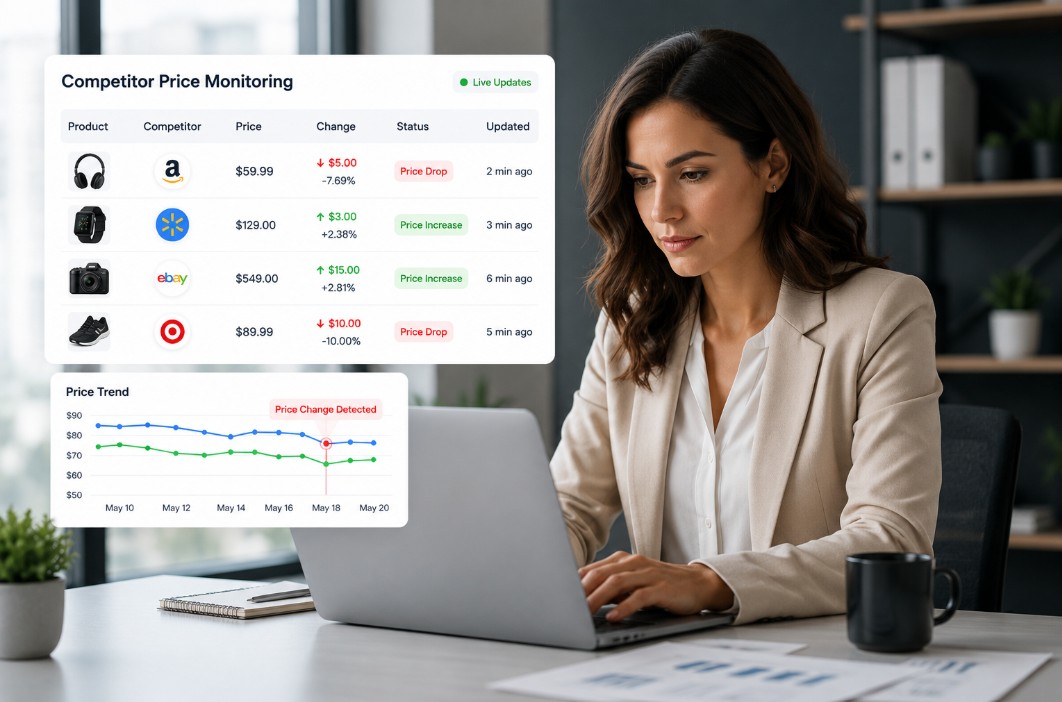
Competitor price changes influence:
For retailers, the risk is losing sales because a competitor becomes cheaper on a key SKU. For brands, the risk is uncontrolled reseller discounting or price erosion. For pricing teams, the risk is making decisions based on stale market data.
A real-time monitoring setup gives teams visibility into what changed, where it changed, when it changed, and whether action is needed.
A price change is not only a visible product price update. A complete monitoring system should detect:
The product’s listed price increases or decreases on a competitor website, marketplace, or reseller page.
The competitor adds a discount, coupon, bundle, loyalty price, or temporary campaign price.
The winning seller, buy-box position, delivery cost, or marketplace offer changes.
A competitor goes out of stock, comes back in stock, or changes availability messaging.
The product price may stay the same, but shipping cost changes can alter the true customer-facing price.
For brands, a reseller price drops below the agreed minimum advertised price or recommended retail price.
Start by selecting the competitors and channels that actually influence buying decisions.
For tgndata’s audience, this usually includes:
Avoid tracking every possible website at first. Prioritize the competitors that affect revenue, margin, or brand control.
Accurate product matching is the foundation of price intelligence. The system must know that your product and the competitor’s product are truly comparable.
Matching can use:
Poor matching creates false alerts. For example, comparing a 500 ml product with a 1 L product can make a competitor look cheaper when they are not.
A real-time system collects competitor pricing data through automated website monitoring, marketplace tracking, APIs where available, and structured data feeds.
The system should capture:
Public software profiles describe tgndata as supporting competitor price tracking, website monitoring, real-time monitoring, real-time updates, dashboards, API access, alerts, and dynamic pricing features.
Once data is collected, the system compares the latest observed price against the previous price.
The key fields are:
A basic rule might say:
“Alert the pricing team when a top competitor drops price by more than 3 percent on a priority SKU.”
A more advanced rule might say:
“Trigger a repricing recommendation only when the competitor is in stock, the product match confidence is high, and the new price is below our current price by more than 2 percent.”
Not every price change deserves action. Real-time monitoring becomes useful when alerts are filtered by business impact.
Good filters include:
This prevents teams from being overwhelmed by low-value alerts.
A price change is only useful if the right person sees it quickly.
Alert destinations can include:
The alert should answer three questions immediately:
Start with products that drive revenue, margin, or competitive pressure. These usually include bestsellers, key value items, seasonal products, promoted SKUs, and marketplace-sensitive items.
A competitor price only matters if the product is actually available. A low price on an out-of-stock product should not automatically trigger a pricing response.
For ecommerce, the visible product price is not always the final price. Shipping, fees, marketplace seller terms, and delivery speed can change the real competitive position.
Historical data helps teams understand patterns, not just isolated changes. It can reveal whether a competitor discounts every weekend, reacts to your promotions, or changes prices before major campaigns.
Detection and reaction are different steps. Real-time monitoring tells you what happened. Pricing strategy determines whether you should respond.
A competitor price drop does not always mean you should match it. You may choose to hold price if your product has stronger availability, faster delivery, better reviews, exclusive bundles, or better brand trust.
Manual competitor tracking may work for a small product list, but it breaks down as soon as the business grows.
| Method | Best for | Limitations |
|---|---|---|
| Manual checking | Very small catalogs | Slow, inconsistent, hard to scale |
| Spreadsheets | Early-stage tracking | Data becomes outdated quickly |
| Basic scraping | Narrow use cases | Matching, reliability, and maintenance issues |
| Price intelligence software | Retailers, brands, ecommerce teams | Requires setup and clear rules |
| Dynamic pricing platform | High-volume pricing operations | Needs strong governance and margin rules |
For most serious ecommerce teams, automated price monitoring is the practical path.
A strong tool should include:
tgndata is publicly positioned around many of these capabilities, including competitor price tracking, benchmarking, trend analysis, dashboards, alerts, API access, real-time monitoring, dynamic pricing, and market data analysis.
A retailer tracks 5,000 products across 12 competitors and 3 marketplaces.
The monitoring system detects:
The system sends an alert to the pricing manager and flags the product in the dashboard. Depending on margin rules, the team can:
tgndata is relevant for ecommerce teams, retailers, and brands that need continuous visibility into competitor prices, product availability, assortment, marketplaces, and pricing trends. Public listings describe tgndata as a cloud-based pricing intelligence platform with competitor price tracking, real-time monitoring, alerts, dashboards, API access, historical data, and dynamic pricing features.
Want to stop checking competitor prices manually? Use tgndata to monitor competitor price changes, stock status, promotions, and marketplace movements in real time, then turn those insights into smarter pricing decisions.
Price intelligence software tracks competitor prices and helps businesses decide how to price their products.
Repricing tools automatically change prices, while price intelligence tools provide insights and strategy (and may include automation).
Ecommerce retailers, brands, marketplace sellers, and pricing teams managing competitive products.
No. Any business operating in a competitive pricing environment can benefit.
Yes. It improves pricing decisions, leading to higher conversion rates and better margins.
Competitor prices can change dozens of times per day across ecommerce sites, marketplaces, and reseller channels. Without real-time visibility, pricing teams risk reacting too slowly, losing margin, or missing opportunities to stay competitive.
An effective competitor price monitoring strategy combines accurate product matching, automated data collection, real-time alerts, historical tracking, and business rules that help teams focus on the changes that actually matter.
The goal is not to react to every price movement. It is to make smarter pricing decisions based on reliable market intelligence.
For retailers and brands, real-time competitor price detection creates a stronger foundation for pricing strategy, promotional planning, marketplace performance, and margin protection. With the right monitoring system in place, teams can move from manual checks and outdated spreadsheets to faster, data-driven pricing decisions.
We use cookies to provide you with an optimal experience, for marketing and statistical purposes only with your consent, which you may revoke at any time. Please refer to our Privacy Policy for more information.










Missing an important marketplace?
Send us your request to add it!